AutoCount Accounting

AutoCount Accounting is a powerful, user-friendly solution designed to simplify financial management for SMEs and growing businesses. Trusted by thousands across Malaysia, it helps you handle your daily accounting tasks — from invoicing and inventory tracking to SST compliance and financial reporting — all in one system. Complete integration of Accounting (GL, AR, AP), Inventory (Stock), Billing (Sales, Purchase) and more than 30 other modules (Multi Currency, Project, Department, MultiUOM, Serial Numbers, Item Assembly). Ideal yet affordable solution for SMEs of all sectors.

Benefits of AutoCount

29 Years of
Experience

In matured software development, meeting requirements, fullfilling and improvising.

Affordability, Flexibility & Extensibility

High quality product with low pricing. You may start with basic package and later extent to upgrade/add-on when business grows.

Guaranteed Customer Support

All customers and dealers are backup by dedicated team of technical support from the principal.

Extensive Service
Network

›300 trained and experienced authorized dealers to provide excellent service and support.

Continuous
Development

Established developer with ambitious missions. Products will be updated/upgraded to meet latest requirements and trends.

Advanced
Technologies

Adopts popular and advanced technologies to ensure the strength of platforms for long-term development.

Why AutoCount Accounting

Fit Any Business

Fits Any Business 9 different versions, add on modules and customization available to ensure this software is a right fit.

SST Compliant

Built in accordance to latest SST accounting standards, making it easy for data input and reporting.

No Double Entry

13 well designed source document entries for different type of transactions.

Real Time Posting

Once transaction is saved, it will post to GL accounts and update reports instantly.

Less Error

Integrated accounting system with automated processing reduces the probability of human error.

No Year End Closing

Option to do year-end closing or keep multi-years of data in a single account book.

Search Data Instantly

Strong search capability to help you find past transactions and documents easily.

Drill Down Reports

Drill-down feature allows you to drill down to source documents from reports and chart of accounts.

Why Should You choose AutoCount Accounting 2.0

Effortless Productivity

Create as many templates as you need for frequently used documents, and schedule all recurring transactions for future periods. Improve productivity and efficiency in daily routines with a few simple actions.

  • Schedule Your Recurring Entries
    For many businesses, recurring transactions and accounting entries can be a huge volume of repetitive and tedious workload. Now you may schedule all future transactions and decide either to generate the entries automatically or to be prompted with reminders.

  • Send Documents/Location via WhatsApp
    Sending documents/reports/location made easy with WhatsApp. Just maintain the recipient’s WhatsApp contact number, key in the message, and Send it. The recipient shall receive the message and download link via WhatsApp immediately.

  • Use of Document Templates
    Create a template for a frequently used document (e.g. Cash Sale) and enjoy SPEEDY processes in the subsequent billings. Imagine how much time you can save on documents such as Quotation, Sales Order, Invoice, Credit Note, Request Quotation, Cash Sale…

  • Generate PO from Reorder Advice
    Stock replenishment can now be easier and quicker. Browse the Reorder Advice anytime, make decision from the listed/proposed items and quantity to be purchased, then straight away Generate Purchase Orders immediately to your suppliers. Increase the stock reorder efficiency by at least 80%.

  • Smarter Intelligent Costing
    Operate your business comfortably, and the AutoCount Accounting system will accurately take care of your inventory costing intelligently. This unique feature is created to help resolve the inaccurate stock costing problem facing most industries. It’s a revolutionary feature only available in AutoCount Accounting.

Enhancement Hotpicks

Compare to version 1.9, this version 2.0 is loaded with numerous enhancement and enrichment. Here are 5 most sought after features

  • Auto-Generate Stock Adjustments
    After a stock take, the system shall detect the differences between physical quantity and book quantity. What you need to do is to determine whether or not to auto-generate stock adjustment entries according to the discrepancies.

  • 6 Levels Selling Price With Auto-Adjustment
    For each stock item, you may now maintain up to 6 levels of selling price and assign to different categories of customers. For each level of selling price, by specifying the percentage of margin and markdown rate, the selling price shall be auto-adjusted with the changes of Cost price.

  • Better Stock Filtering/Analysis
    For better and more flexible filtering as well as analysis reporting, all inventory items can be differentiated with Item Group, Item Type, Item Brand, Item Category and Item Class.

  • Applicability of Stock Items
    Some of your stock items are not for sale (e.g. for own use) or are used only in specific processes (e.g. raw materials are used only in making finished goods). By specifying the applicability of stock items, you may reduced the loading of non-relevant items during processes of Sales, Purchase, POS, Raw Materials and Finished Goods.

  • Enhanced User Access Rights Setting
    Access Rights Maintenance is further enhanced for better experience. You may now view the comparison of access rights items for any selected user against its user group, and Export access rights items to Excel. It also allows to copy access rights from existing user to new user.

  • Unlimited Alternative Item Codes
    Each product item can be match with unlimited alternative item codes. For example, barcodes, special codes, simplified codes, supplier-used codes… all these different codes will refer to the same product item. This makes data entry and item searching much easier and flexible.

Work Conveniently

Sometimes a tiny change, be it a change in habit or the tools, can make a big difference in the result. We looked into your requirements, even the tiniest one, hoping to offer greater working experience of convenience.

  • Transfer of Documents in Either Way
    When creating a new document using Transfer method, you can choose to use either ‘Transfer To’ a new document from an existing document, or ‘Transfer From’ an existing document to a new document, whichever works better for you.

  • Easier Credit Control
    Any creation of documents that violating credit limit will send a prompt directly to your screen and requesting your approval to proceed. It is convenient and it is effective.

  • Define Your Own Input Layout
    This is a practically useful minor customization many may need for their own purpose. When creating transaction for sales, purchases and inventory, your own defined additional fields allows you to input desired info/data.

  • Internet Login (Internet User)
    Working from home is part of the new normal. With Internet Login, account books database installed on office server can be accessed anytime while staying at home, via internet connection.

It Flows Better

This version also emphasizes on better flows of recording, transaction and tracking. Special highlights are the process of consignment, deposit, purchasing, and related documents flow.

  • Refined Consignment Module
    Your may be consignor, or consignee, the most important things you need from the software is a good flow of consignment activity records and reports. It covers from the beginning of consignment note, to the transfer of consignment return of invoice, and status of inventory reports.

  • Deposit – Apply, Refund & Forfeit
    If you do collect deposits from customers, you will better appreciate the features deposit management. It allows you to record each deposit received, transfer of deposit (as payment) to offset invoices, and multiple entries for refunds and forfeits.

  • New Document – Purchase Request
    Purchase Request is more to a internal document in procurement process, usually used before Request Quotation and Purchase Order are sent to suppliers.

  • The Flow of Related Documents
    In one screen you can view the complete flow of related documents. From the beginning of non-accounting documents, to official business billing and related payments or credit notes. Besides, you may click on any document and drill into its details.

  • Stock Disassembly
    Opposed to stock assembly that build a new product item by consuming several other items (parts), this Stock Disassembly allows you to break a product item into multiple items (components), at the same time keep tracks of costing and quantities. E.g. big jumbo roll of paper cut into different wide of paper roll, a whole chicken to different parts of chicken…

  • Advanced Quotation
    Better internal control before sending out sales quotations/proposals. You may set stricter approval process before finalising a quotation, keeping historical records of all revised versions, and sending alerting email on action required/approval/rejection.

The Power of Flexibility

From general software users to advanced users, we offer more options in this software. This includes, among all, the Advanced Keyword Search, Stock Item Inquiry With Details, and Formula Editor.

  • Advanced Keyword Search
    When using keyword search, all partially and fully matched records will be displayed. This advanced powerful search feature is going to make your life easier, not just a bit.

  • Stock Item Inquiry With Details
    For those who use the feature of Stock Item Inquiry often, will find it even better in version 2.0. The new arrangement showcases greater details of the highlighted stock item in one screen.

  • Use of Formula Editor
    For advanced users or those with technical know-how, you may now customize a field (of any document), even in the detail band, by applying formulas to meet your desired outcome. This is particularly useful for complicated calculations.

Make It Personal

You may have some personal preferences when comes to colors, shortcuts and favorite functions. Every time you login, it appears as what you wanted it to be.

  • Choose Your Theme Color
    Pick your referred theme color on this software with your login. If this makes you feel more comfortable, why not?

  • Quick Access Data Charts
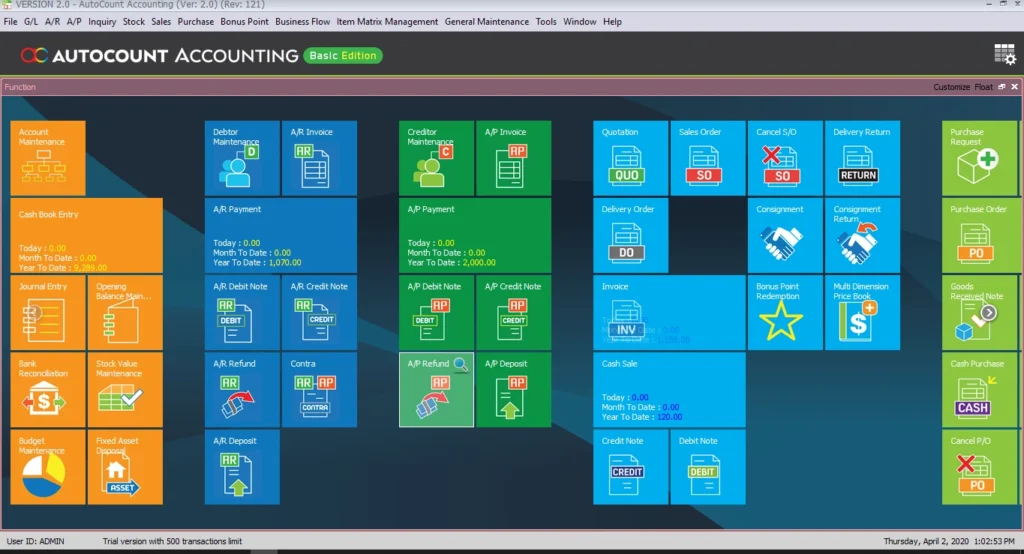
    Determine what are the tiles (main functions) you would like to have on the main page. You may consider favorite functions or those you need to use frequently.

  • Favorite Tiles on Main Page
    For advanced users or those with technical know-how, you may now customize a field (of any document), even in the detail band, by applying formulas to meet your desired outcome. This is particularly useful for complicated calculations.

Get Your Free Trial Now!

Download the trial to experience yourself today.

The AutoCount
Ecosystem

AutoCount Plugins

Every business has specific needs which possibly affects the financial processes. AutoCount provides endless possibilities in customizing AutoCount to suit your business needs, resulting in better and more organized accounting system.

Custom Fields & Tables

Need further information to be added to your accounting software? Create custom fields and tables.

Create better user experience & navigation for your users by adding buttons and actions to your software

Need specific information in your reports or special layouts? get your report customized in the layout of your preference.

Meet Our Clients :

We're Here to Help You Succeed

Important Notification
We’ll update you whenever there is a critical software update or any regulatory changes that would affect you.
Ticketed Support System
Every support request either via call or email would be recorded and tracked till completion
Software Training
We hold regular training, from product knowledge to information on regulatory changes

For product and service issues, please contact our team

Talk to Sales
Look for Support

Smarter Intelligent Costing

Instant Smart Stock Recalculation

When you make changes in sales/purchase documents that affecting fate, quantity, price or location of stock item. Intelligent Costing will be triggered automatically, and a smart stock recalculation process starts instantly.

  • Backdated sales/purchase documents such as Purchase Invoice, Purchase Returns, Sales Invoices, Credit Note
  • Edit/delete/cancel sales/purchase document that were saved earlier involving date, quantity, price, location
  • Modify sales/purchase document dated a long time ago.
 

The efficiency of recalculate stock costing will be increased up to 99% as system only recalculate those modified transactions. No more hassles on IT administrative works or monitoring on the stock recalculation progress.

Timely & Accurate Stock Costing Reports

With this Intelligent Costing module, you will always get real time and accurate stock costing reports and products profit margins to avoid selling at the wrong price. This feature is ideal for those who have heavy load of transactions, huge variety of stock items, and retailers of fast-moving items.