What is AutoCount MCP?
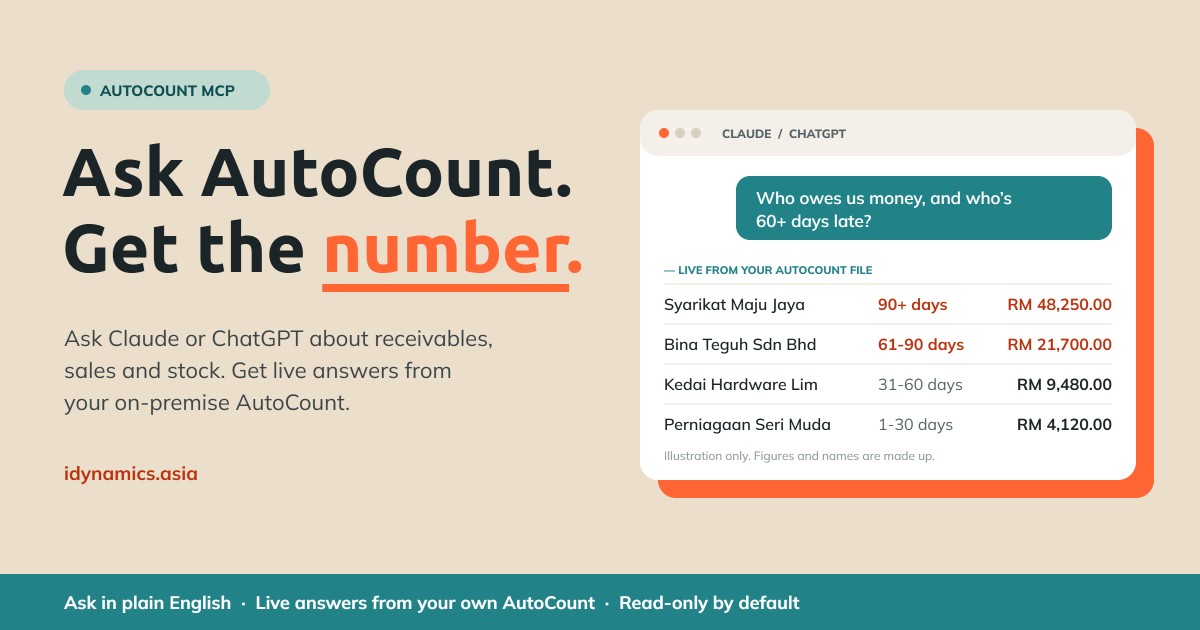
AutoCount MCP lets you ask Claude or ChatGPT a question about your business and get the answer straight from your own AutoCount. Who owes us money? How much stock is left? How did August compare to July? You type it in plain English, and the figures come back live from your company file.
No report to run. No export to Excel. No waiting for the one person in finance who knows where everything is.
If you’re using on-premise AutoCount Accounting, here’s what AutoCount MCP is, what you can ask it, and what you need to get started.
Key takeaways
- AutoCount MCP connects on-premise AutoCount Accounting to Claude or ChatGPT.
- You ask in plain English and get live figures from your own company file.
- It’s read-only by default. Writing records is a separate switch you control.
- You need an active AutoCount licence, a Claude or ChatGPT plan with connectors, and a server that’s on.
MCP in one minute
MCP stands for Model Context Protocol. It’s an open standard that lets AI assistants like Claude and ChatGPT connect to business software.
Think of it like a plug socket on your office wall. The socket doesn’t care which appliance you plug in, as long as it fits. MCP is that socket for AI. AutoCount MCP is the plug that fits AutoCount into it.
Here’s why that matters. Ask a normal AI chatbot “who owes us money?” and it can only guess, because it has never seen your books. With AutoCount MCP, the assistant doesn’t guess. It asks AutoCount directly, through a fixed set of approved requests, and shows you what AutoCount returned.
So the AI does the understanding (what you meant), and AutoCount does the numbers (what’s actually in your ledger). Each does the job it’s good at.
What you can ask AutoCount MCP
Here are six questions teams ask every week, and what comes back.
| Area | Ask this | What you get |
|---|---|---|
| Receivables & ageing | Who owes us money, and who’s 60+ days late? | Customers, amounts and ageing, live from your ledger |
| Sales | How did August compare to July? Who are my top 10 customers? | Period comparisons and rankings, without building a report |
| Stock & pricing | How many are left, and what did we last sell it at? | Stock balance, last price and price history by customer |
| General ledger | What went through this account last quarter? | GL transactions for any account and period |
| Bank reconciliation | What’s still unreconciled in the Maybank account? | Outstanding items, ready to match against your statement |
| Records | Raise an invoice for Syarikat ABC, same items as last month. | A new invoice in AutoCount, only if you’ve switched writing on |
You can keep going, too. Ask “show me the invoices behind that” or “which of these is the biggest?” and the assistant follows up with another request to AutoCount.
Watch the 50-second intro to see a question go in and live figures come out.
How AutoCount MCP works
Every question goes through the same four steps, usually in a few seconds.
- You ask, in plain language. Type it into Claude or ChatGPT the way you’d say it out loud. No menus, no report codes.
- The assistant picks the right tool. Each question maps to a specific, approved AutoCount request. It’s not a free-for-all search of your database.
- AutoCount runs the request on your live file. Your real data, as it stands right now. Customer and item codes are looked up, never guessed from a name that sounds close.
- The answer comes back as data. Actual figures and records, so you can trust the number and act on it.
The important part is step 2. The assistant can only use requests that have been set up and approved for your company. That’s what keeps it accurate, and it’s what keeps it safe.
What you need to run AutoCount MCP
The list is short:
- An active AutoCount licence. On-premise AutoCount Accounting, on a supported version. We check yours first. AutoCount MCP is an add-on, not a replacement.
- Claude or ChatGPT. On a plan that supports connectors. The subscription is yours.
- A server that’s on. It needs to be switched on and online when your team asks.
- Your top five questions. Tell us what your team asks most, and we set those up first.
You don’t need to know anything technical. iDynamics installs and configures it on your server, agrees access with you, and tunes it around your team’s questions.
What AutoCount MCP isn’t
A few things worth clearing up:
- It isn’t a chatbot that guesses. The figures come from your AutoCount file, through fixed requests, not from the AI’s memory.
- It isn’t open access to your database. The assistant can only call the requests set up for you. One connection per company file.
- It doesn’t change your data unless you say so. It’s read-only by default. Creating or editing records is a separate switch that you control.
- It isn’t a replacement for AutoCount. Your team still uses AutoCount as normal. This just gives them a faster way to ask it things.
Want the full picture on data and access? See how AutoCount MCP handles safety, from read-only defaults to who gets access.
If you are weighing up AI-built software against a proven system, read our view on whether AI should build your ERP. Businesses running Oracle NetSuite can use built-in NetSuite AI features for similar tasks.
AutoCount MCP FAQs
Which AutoCount does AutoCount MCP work with?
On-premise AutoCount Accounting, on a supported version. We check yours before anything else.
Do I need a ChatGPT or Claude subscription?
Yes. You’ll need Claude or ChatGPT on a plan that supports connectors. The subscription is yours; we set up the connection.
Can AutoCount MCP change my data?
Only if you let it. It’s read-only by default. Creating, editing or cancelling invoices, orders and journals is a separate switch you turn on and off.
Will the AI make up numbers?
The figures come from your AutoCount file through fixed requests. The AI shows what AutoCount returned.
Start with one question
The easiest way to see if AutoCount MCP fits your team is to try it on a real question. Tell us the one your team asks most, and we’ll set that up first.
In a free session, we check your AutoCount, show you what’s possible today, and say clearly what isn’t.

Stephanie Chong
Stephanie writes about Malaysia’s e-invoicing, SST, tax codes, and accounting system readiness for SMEs. At iDynamics Asia, their content helps business owners and finance teams understand LHDN requirements, prepare their accounting software, and avoid common setup mistakes when managing tax-related business processes.
Expertise Areas:
Malaysia e-invoicing, LHDN e-invoice readiness, MyInvois, SST, tax codes, self-billed e-invoices, invoice consolidation, accounting system setup, SME finance operations.